Radio control software for shortwave listening
I’ve released SwHunter2 (version 0.8.1 beta), the new version of my software for SWL/BCL activities. It is free, libre and open-source software.
What does it do?
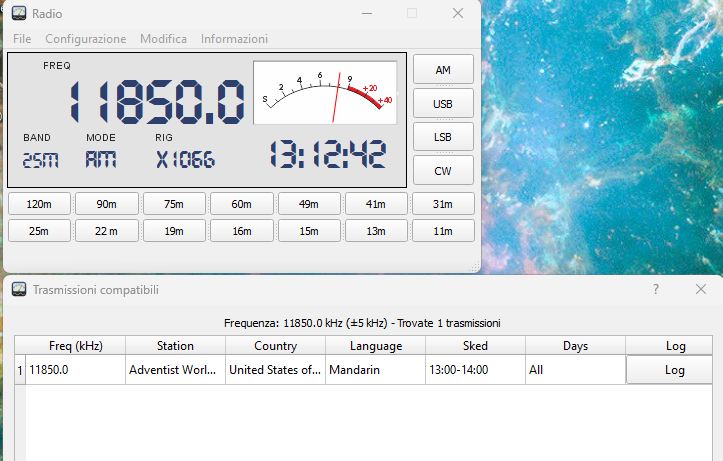
SwHunter2 connects a receiver or transceiver to the EiBi international broadcasting database. While you are listening, the program reads the frequency from your radio and tells you who is broadcasting, where from, in which language (and at what time). The same database also works in reverse: select a station and tune your radio to its frequency.
The main panel displays:
- the connected radio and current frequency;
- band and mode (AM, USB, LSB, CW);
- UTC clock;
- S-meter;
- buttons to jump to broadcast bands, tuning the radio to the band’s center frequency.
To tune, you can enter the frequency using F1, or use the mouse wheel over the frequency display. The tuning step can be configured by right-clicking. Holding Ctrl makes the step 10 times larger, while Shift makes it 10 times smaller.
What’s new compared to the Python version?
The first version was written in Python. SwHunter2 is a complete rewrite in C++/Qt, primarily aimed at better integration with Hamlib, the library that provides the foundation for controlling most amateur and professional receivers and transceivers. It works with all radios supported by Hamlib. That’s hundreds of models from many manufacturers, configurable through a dedicated window: manufacturer, model, serial port, baud rate, data bits, stop bits and parity. There’s also a test button to verify the configuration before saving it. The software supports managing multiple connections to different devices.
If communication with the radio is interrupted, the program cleanly closes the connection, reports the error and disconnects the radio. You can then simply reselect the configuration from the menu to resume operation.
The EiBi database, always up to date
The EiBi list changes with every broadcasting season. SwHunter2 automatically checks for and downloads updates, reporting how many records have been imported and whether any errors occurred when the operation is complete. If you prefer, you can manually import an EiBi-format CSV file from the File menu.
There are two ways to search:
- Clicking the frequency on the display immediately shows the broadcasts matching, within a small tolerance, the frequency you are tuned to, taking the current time into account;
- Info > Search searches the entire database by frequency, time, days of the week, station, country, language, target area and band.
Tables, memories and log
From the Edit menu, you can modify areas, bands, countries, languages, transmitters and the broadcasts themselves. So, if you have better information than what’s in the database, you can correct or supplement it. There’s also a memory bank where you can store frequencies, modes, labels and notes.
Listening sessions can be saved to the ADIF-format log, either directly from the results window or through the frequency context menu (“Log current frequency”). ADIF is a standard format supported by most logging programs.
The interface is available in Italian, English, German, French and Spanish. The language is selected automatically, or you can specify it using swhunter -l <language code>.
Languages other than Italian and English are machine translations. Please let me know if you spot any possible errors.
It’s still a beta version
SwHunter2 is still being tested. I use it with my own equipment, but every radio has its own quirks, so there may be bugs specific to certain devices. That’s why I need your feedback:
- which radios you’ve tested it with and how it performed;
- any errors you encounter, together with the log file (
swhunt.log); - suggestions about usability and missing features.
Please report anything you find, even through a simple comment below.
License
SwHunter2 is distributed under the GNU LGPL 2.1 license, the same license used by the radio control library – Hamlib.
The source code will soon be available on GitHub. I also plan to release versions for Linux and Mac.
The Windows package (19 MByte) is currently available here: .
73 de I8ZSE
Giorgio
Share this content:
Post Comment