Going remote!
Controlling the Radio Is Not Enough
In the previous article we saw how it is possible to distribute station control across multiple applications and devices, using an intermediate layer that allows the radio’s CAT interface to be shared, and that distributing a station within your local network is very different from using it when you are on the other side of the network.
Once you leave the local network, the problem changes radically: it is no longer enough to make programs talk to each other, you have to bring the radio station itself to you.
There Is Much More Than the VFO
If a radio were nothing more than a VFO, a mode switch and a PTT button, remote operation would be a relatively simple problem. In reality, however, a modern radio station is a much more complex experience.
Frequency is only one of the parameters that need to be controlled, while an operator sitting in front of the radio continuously uses a whole range of functions that are often not even perceived as CAT controls: IF filter width and position, roofing filter, IF shift, notch filter, AGC, preamplifiers and attenuators, noise blanker and noise reduction, RIT and XIT, VFO A/B and split… and the list could go on for quite a while. You may have noticed that most of these are receiver-section controls, and they are, moreover, precisely the functions that distinguish higher-performance equipment. By contrast, CAT control software, whether standalone or integrated into applications, is generally limited to the basic functions.
A truly remote station, therefore, must allow the operator to interact with all the controls of their radio, and in the most natural way possible: only then can it reproduce the experience of the local station at a distance.
The Radio Interface Problem
This is probably the most difficult part of the whole problem: although CAT commands are now capable of managing practically all the main parameters of current radios, it is still difficult to reproduce in software an interface that even remotely resembles the physical one the operator is accustomed to working with. We may know that the radio is tuned to 14.200 MHz, that we are in USB, that PTT is disabled and – perhaps – that the bandwidth is set to 1.8 kHz. But this does not mean that we have before our eyes what the local operator sees. All modern radios have complex operating panels: my FTdx-1200 has ten knobs and 52 buttons – not counting the functions buried in the menu. A remote station worthy of the name must be able to reproduce most of these controls remotely.
It is objectively complex to build a remote interface that can truly be universal. There is an interesting proposal, wfview – an open source project for controlling some modern Icom and Kenwood radios over a network – but its scope is very limited, restricted to a few recent models. And if we rule out from the start the control systems included in some applications – which, as I mentioned, are too “basic” – the available options are really scarce.
More precisely, my impression is that there is only one that is sufficiently capable and functional: Flrig (I wrote about it here),
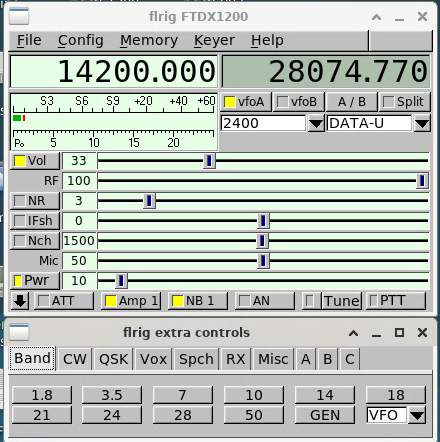
which, despite an interface that is spartan by modern standards, allows remote control of most of the functions physically available on the radio, and also implements three groups of additional commands (three panels, A, B and C) that can be customized. And since rigctld can be configured to control flrig, rather than the radio directly, it is an addition that integrates perfectly into the ecosystem we had designed in the aforementioned article. It should be noted, however, that not all radios have the same level of support: because of the way they were designed and evolved over time, CAT implementations are actually very different. In the beginning they provided access to just the basic functions, and were gradually expanded over time.
Now that we have virtualized the radio’s control panel as well, we are free from the physical constraints. But what is the best strategy for transferring full control of our shack outside the home?
A Note on Security
Remote operation of a station most often relies on an Internet connection, so the simplest solution might seem to be to open ports on the router and expose the services directly online. I strongly recommend against doing so, however: exposing applications to the Internet without fully understanding the implications is a major risk that should not be underestimated. It is much safer to use a virtual private network layer (VPN, such as WireGuard or OpenVPN), which can easily be installed locally, and access the station controller remotely through it.
The Technical Limitations
In addition to security, however, the Internet introduces another problem, this time purely technical: a radio station is, at least in part, a real-time system, in which a series of operations take place within predefined time constraints. The operator does not simply issue commands and wait for them to be executed: they continuously listen to the receiver, watch the spectrum, adjust the tuning, modify filters and gain, and react to what they are hearing.
When we use a network to transport data, every passage through the network introduces some delay, and above all makes the data delivery time less predictable, mainly because of two factors:
Latency
Latency is simply the time between an event and the moment when we perceive its effect: if we speak into the microphone and the audio reaches the remote station 100 ms later, we have 100 ms of latency in that direction. If the radio’s audio signal has to travel back to the headphones through the same network, it will have its own delay as well. For a typical computing application, latency of a few tens of milliseconds is generally irrelevant, but in radio operation it can become noticeable. The problem is not necessarily that the radio responds slowly. It is that the operator is no longer interacting directly with what is happening at the radio.
This becomes particularly evident in some activities: during an SSB contact, for example, a certain amount of latency may simply be annoying; during a CW contact, the situation is much more delicate, since the timing relationship between what we hear and what we transmit is an integral part of operating. Digital modes can also be affected in a different way, because some applications are much more tolerant of CAT-control latency than they are of real-time audio latency.
Jitter
Latency, however, is not necessarily the worst problem. A low and constant latency can, all things considered, be dismissed as a simple nuisance. But what happens if some packets arrive after 50 ms, others after 80 ms and others after 200 ms? The experience becomes much less predictable. This variation in delay is called jitter.
To understand it intuitively, we can imagine sending a sequence of audio samples at regular intervals:
Send:        |--|--|--|--|--|--|--|--|
               1  2  3  4  5  6  7  8

Arrival:     |---|-----|-|------|--|---|
               1    2  3    4    5  6
The receiver no longer receives the data with the same regularity with which it was produced, and this is genuinely problematic. To prevent this from immediately resulting in audio interruptions, real-time transmission systems normally use a jitter buffer, an area of memory in which a small amount of data is accumulated before being played back, so that timing variations can be absorbed.
But there is an unavoidable trade-off: the larger the buffer, the greater its ability to absorb jitter; at the same time, however, the larger the buffer, the greater the overall latency. In other words, we cannot completely eliminate the problem: we can only find a compromise between responsiveness and continuity of the audio stream.
The Internet Is Not a Cable
This is probably the most important concept to keep in mind when designing a remote station: an Internet connection is not simply an extension of the cable connecting the radio to the headphones. Packets can take different routes, be queued in routers, experience variable delays and, under certain conditions, be lost. The situation can also change over time without any changes having been made to the station configuration. For this reason, a solution that works perfectly at 10 a.m. may perform very differently a few hours later, even though apparently nothing has changed.
The quality of remote operation therefore depends not only on the speed of the connection, but above all on latency, jitter, packet loss and connection stability. And this is an area where confusion is common: having a 1 Gbit/s connection does not automatically mean having a connection suitable for a remote station. Radio audio generally does not require large amounts of bandwidth; it is much more important for the data to arrive on time and consistently.
Not All Functions Are Equally Sensitive
The problem is not the same for all components of the station either: a CAT command can tolerate a few hundred milliseconds of delay without particular problems, but if we are listening to an SSB conversation, the delay becomes immediately noticeable; in CW the situation is even more critical, because correct timing is an integral part of the information, and jitter can potentially make a dash indistinguishable from a dot.
Audio is therefore normally the most sensitive component of remote operation. CAT, by contrast, can be relatively tolerant, provided that the connection is stable.
My Solution
Given the importance of the audio component in radio operation, I preferred to handle remote operation using two separate and independent streams.
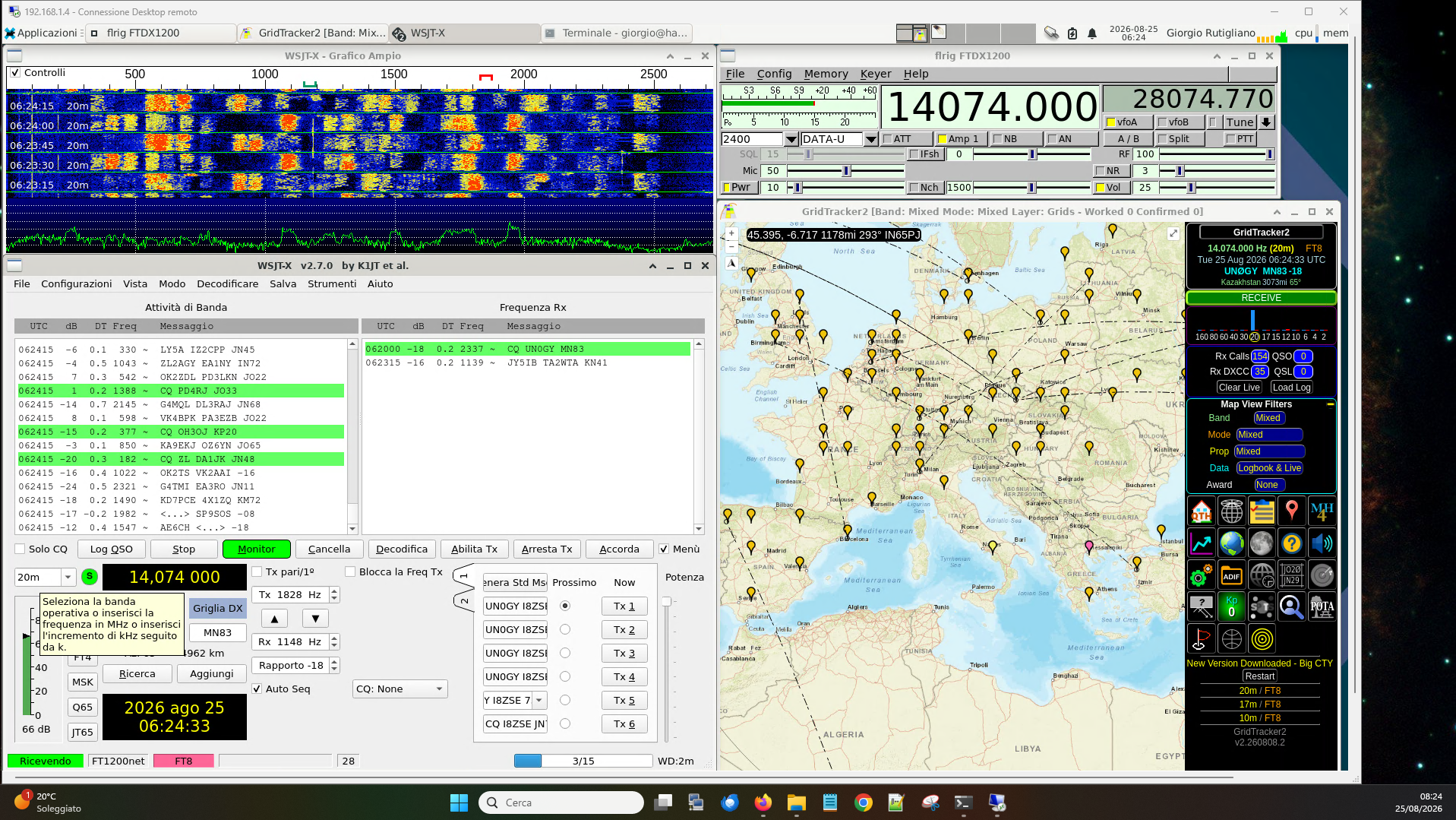
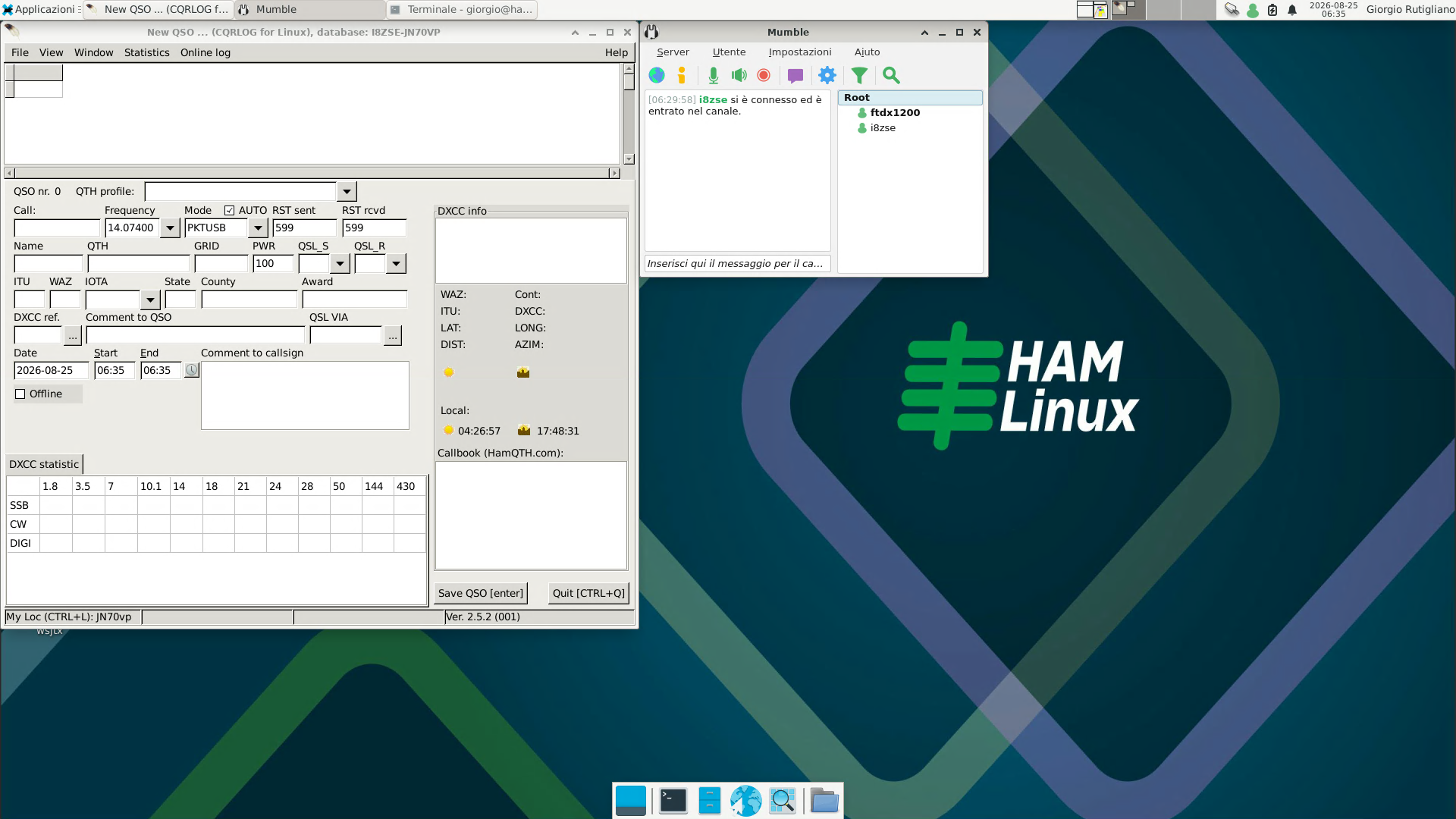
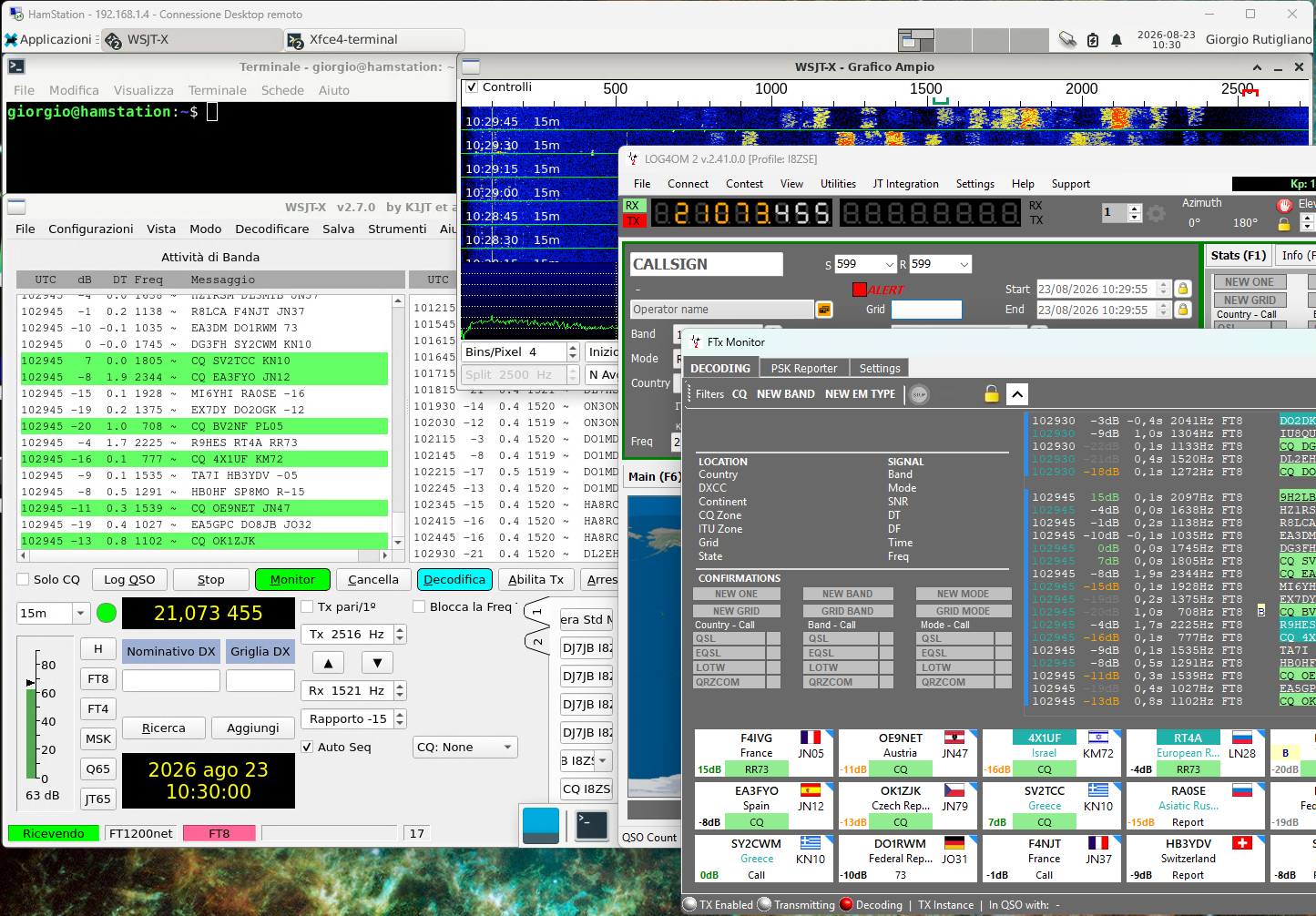
The first stream handles the application layer: all the applications I need run on the station controller, and access to these programs is provided by transporting the graphical interface and keyboard and mouse input over the network. For this purpose I use the xRdp+Xorg combination to make the machine’s graphical environment remotely accessible, just as if it were running on the desktop (which is managed by xfce). This is the standard configuration of the remote service preinstalled on hamlinux, and it can obviously be enabled on any other distribution as well. It is currently one of the virtualization solutions that makes the best use of available bandwidth. I also run Flrig on the station controller, which allows me to interact with the transceiver controls.
The interesting thing is that the remote operator uses the same programs they would use in front of the station: there is no need to learn a new interface, nor to understand how a remote application has decided to represent the radio’s filter. The limitation is, naturally, that of any remote desktop: we are transferring the graphical interface, not the entire computer. The quality of the experience therefore depends on latency and connection quality, but for many radio activities this trade-off is perfectly acceptable. The remote desktop is therefore only one of the ways in which the operator accesses the station: this is an important aspect of the architecture. The system does not need to be designed specifically for remote control; remote operation should be an additional function of the station, not a completely different operating mode.
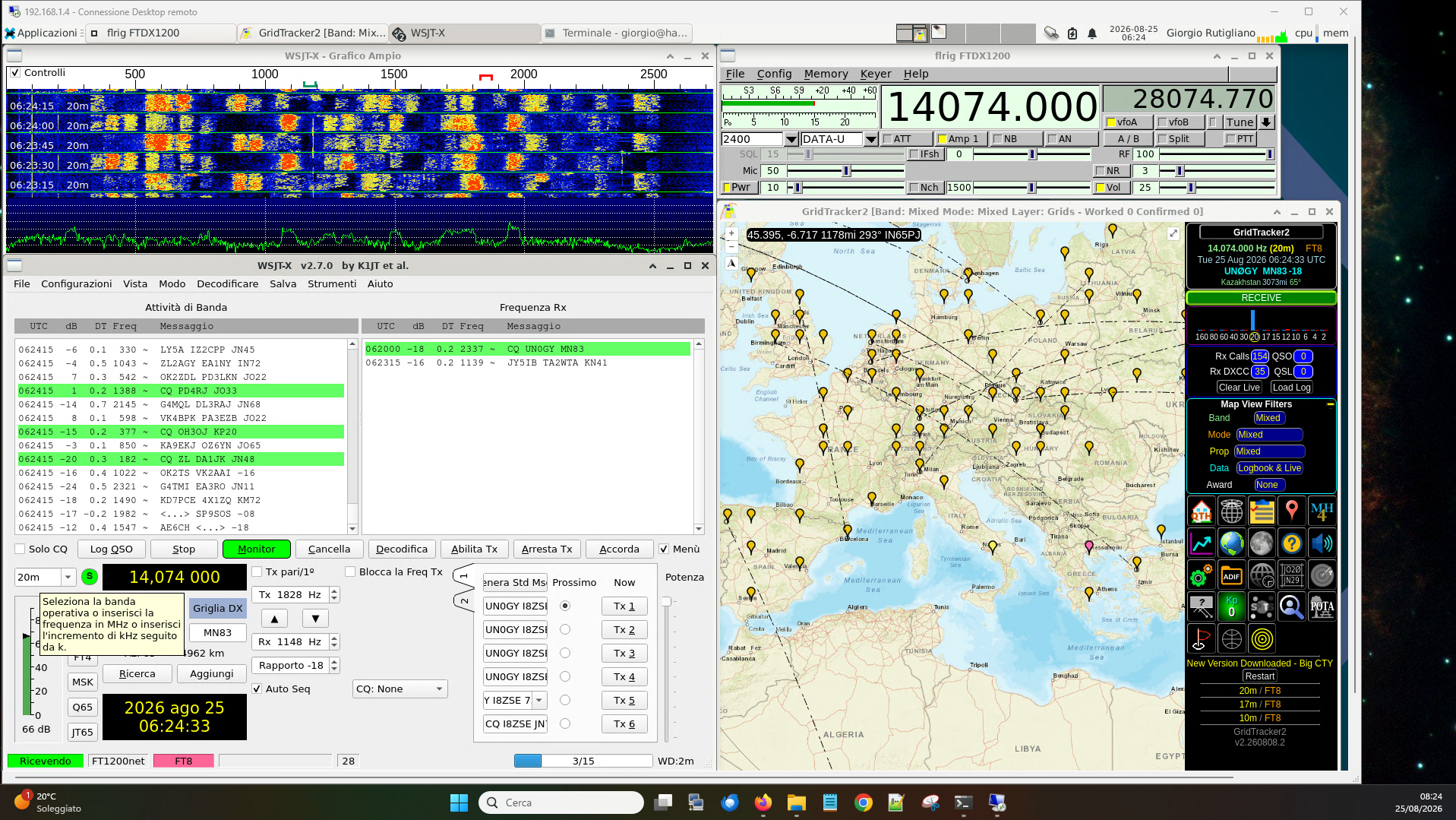
Audio, on the other hand, is handled through a second stream, using a Mumble server: an open source real-time voice communication platform, originally developed primarily for gaming and designed to provide low-latency communications. This too is an application that can easily be installed locally, without relying on third-party services. A client is installed on the station controller, connected to an audio interface linked to the headphone and microphone inputs, and the audio is ready to be transferred to the client installed on the remote PC.
One final operational aspect deserves a mention: unlike what happens in many digital programs, Flrig’s manual PTT control does not have an integrated timeout mechanism (watchdog timer). If the remote connection drops while the radio is transmitting, there is nothing to automatically release the PTT, which is potentially a big problem. For this reason I added a small Python script that, through Flrig’s XML-RPC interface, periodically monitors the PTT status and forces the radio back into receive mode if transmission continues beyond a configurable threshold (6 minutes in my case), regardless of the type of session that caused it. This provides an additional layer of protection on top of any TX Timeout Timer already present in the radio, and it also works when the latter has not been configured or is set to an excessively long interval.
One aspect worth emphasizing is that the VPN is not only there to protect access to the station desktop. In my case, both xRDP and the Mumble server are reachable exclusively within the virtual private network: neither service is directly exposed to the Internet. The VPN therefore becomes the single perimeter through which the entire remote station is accessed, not just CAT control or the desktop.
It is a more complex solution than “open a program and connect to the radio”, but it is also much more faithful to the actual nature of the problem: remote operation does not simply consist of transporting radio commands from one computer to another, but of making different kinds of information, with different timing requirements, available and delivering them to the operator quickly and predictably enough for them to continue using the station.
And unlike what happens when we are sitting in front of the radio, on the Internet we must always accept a certain compromise: a remote station can never be perfectly equivalent to a local station. The realistic goal is not to eliminate the network, but to design the architecture so that its limitations are as imperceptible as possible to the operator and to make the functions needed to use the station available remotely.
What Does “Usable” Mean?
I mainly operate in digital modes, FT8 above all, and this is the area where remote operation delivers its best results: if the connection is adequate, the final experience is not so different from local operation. I have also made a few contacts in SSB, with good results. But personal opinions matter less than facts, so below you can listen to a fragment of communications received on 14.201 MHz (as a reference, LY2NK was coming in at RS 5/5), retransmitted via Mumble configured at 60 kbit/s with low latency, and received over a cellular network connection.
The situation is completely different with CW, because at relatively modest speeds such as 25 words per minute, a dot lasts about 48 ms, so even a few milliseconds of jitter can be perceived as dirty CW. There are various possible approaches to solving the problem, but since I have not yet dealt with it directly in the field, I will refer you to two solutions that seem, in principle, promising: the one by IW7DMH, and the other by N2QM.
From the Distributed Station to the Remote Station
In the first article of this series, the key step was making the CAT connection shareable: the radio ceased to be an exclusive resource of a single program and became a service available to multiple applications, even on different computers, as long as they were on the same local network.
Here the leap is different, and more demanding: it is not enough for the radio to be a service reachable over the network; the entire operating experience – controls, listening, responsiveness – must remain usable even when there is no longer a cable between the operator and the station, but the Internet. I separated the two streams (control/interface via xRDP, audio via Mumble) precisely because they have different requirements, and I chose to protect both behind a single VPN perimeter rather than chasing fragmented solutions service by service.
The result – obviously – does not claim to be perfect, nor identical to operating while sitting in front of the radio: latency and jitter remain physical limitations that no architecture can eliminate completely. But it is a solution built around what already exists – flrig, Hamlib, xRDP, Mumble – rather than trying to recreate the station experience from scratch. Above all, it remains consistent with the architecture described in the first article: the remote station is not a separate system, built solely to be accessed from outside the home. It is the same distributed station as before, whose perimeter we have simply extended.
CW remains the open frontier, and it is probably there that I will return in a future article, once I have tested the solutions I mentioned in the field – or, why not, perhaps even put one of my own into practice.
 Info
InfoFor completeness, I should point out that commercial solutions for remote operation do exist on the market: many manufacturers, for example, offer hardware accessories or software applications for remotely operating some of their equipment.
Share this content:
Post Comment