Ham Package Manager
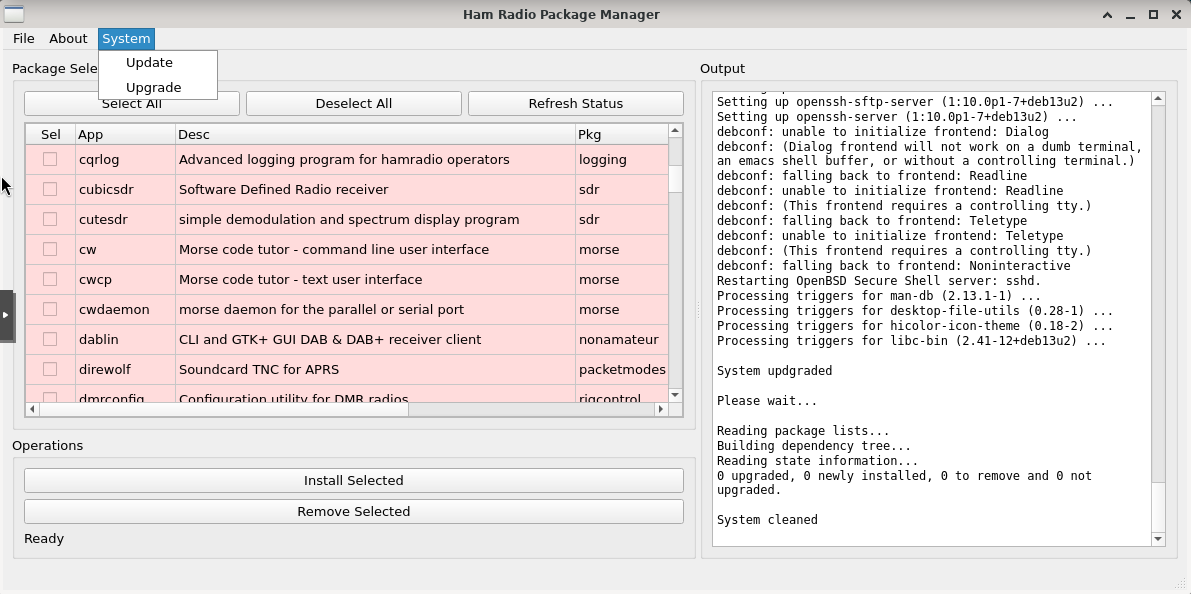
Ham Radio Package Manager was created to address a very practical need: providing amateur radio operators with a simple, visual, and intuitive way to install, update, and remove ham radio software on Linux, without relying on the command line or navigating the complexities of package management. The goal is to make maintaining an operating environment as natural and straightforward as possible, allowing operators to focus on radio activities rather than system administration. It is one of the utilities included with HamLinux and can be launched directly from the System menu.
The interface presents a comprehensive catalog of applications-approximately one hundred programs-organized into the categories familiar to the amateur radio community: SDR, CW, packet radio, digital modes, logging, spectrum analysis, and many others. Each application is displayed as a row containing its name, a brief description, and its category, accompanied by a selector that allows it to be included in installation or removal operations. The visual distinction is immediate: software already installed on the system appears with a green background, while applications that are not installed are shown on a cream-colored background. A quick glance is all that is needed to understand the current state of the operating environment.
Sorting is equally intuitive. By clicking on a column header, the list can be reordered according to that criterion, making it easy to browse the catalog by name, category, or description. Once one or more programs have been selected, the “Install” and “Remove” buttons perform the necessary actions, while the application itself handles dependencies, package relationships, updates, and other technical details.
Before making changes to the system, it is good practice to refresh the package list. From the “System” menu, simply select “Update Package List” and the application will contact the Debian repositories and download the latest package information, ensuring that the catalog remains synchronized with the current repository contents. The same philosophy applies to operating system updates: a similarly straightforward sequence-“Update Package Lists” followed by “Upgrade System”-allows the entire environment to be brought up to date without ever opening a terminal window.
The result is a tool that goes beyond simply installing software. It assists amateur radio operators in the day-to-day maintenance of their systems through an approach that is organized, readable, and respectful of the user’s time. It serves as a compact control panel that brings together everything needed to keep a digital station efficient and up to date.
The source code and Debian packages (.deb) are available from my GitHub repository:
https://github.com/grutig/hapmgr/
Share this content:
Post Comment