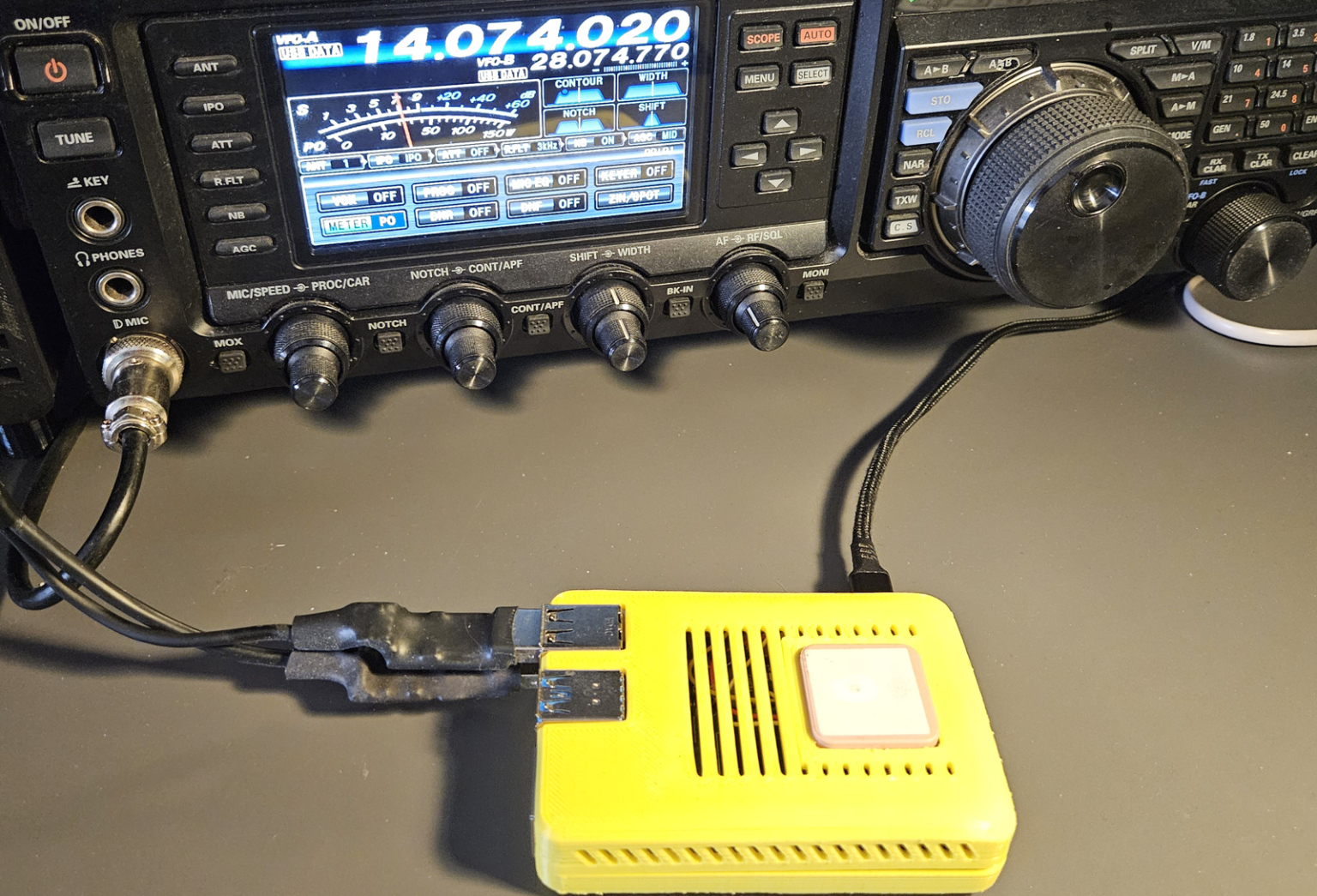
Linux ‘ports’
Serial and audio: nothing to fear
You connect the TRX to the PC and the software cannot find the port. A strange name such as /dev/ttyUSB0 appears (and disappears) without warning.
Let’s clarify an issue that is often a source of headaches, and how to stop guessing.
Anyone approaching the world of digital radio – FT8, PSK31, Winlink, CAT control – quickly runs into an unexpected obstacle: not propagation, not the antenna, but the simple fact of failing to make the computer and the radio communicate. On the system side we have USB peripherals, and Linux assigns seemingly mysterious names that change: /dev/ttyUSB0 today, /dev/ttyUSB1 tomorrow.
Without a map, it is easy to get lost.
The best approach is to start from the beginning: what a communication port is on Linux, how it is assigned a name, why there are “physical” and “virtual” ports, and finally – at the end – an accessory I wrote specifically to allow colleagues who prefer not to use the terminal to get a complete overview of the system.
Everything is a file – the Unix philosophy
On Linux (like all Unix-like systems), every hardware device is represented by a special file in the /dev directory.
This is not just a historical choice: it means that communicating with a serial port uses exactly the same interface (open, read, write, close) as a normal text file. A program like WSJT-X does not need to know whether it is talking to an FTDI chip or a Prolific: it simply opens /dev/ttyUSB0 and writes bytes.
Files in /dev do not occupy disk space because they are interfaces to the kernel. Writing to /dev/ttyUSB0 means sending data to the radio connected to the first USB-serial adapter; reading from the same file means receiving data from the radio.
Names
But how does Linux assign names? A port name is not permanent by default: it depends on the order in which the kernel detects devices at boot time or when a USB device is connected. The subsystem responsible for this is called udev, and it works as follows: when a USB-to-serial adapter is inserted, the kernel loads the appropriate driver (e.g. cp210x for Silicon Labs chips, ftdi_sio for FTDI) and creates the node in /dev. Based on the device type it assigns a name (ttyUSB for USB serial adapters) and a number (0 for the first, 1 for the second, and so on). The zero in /dev/ttyUSB0 indicates it is the first available at that moment. If two interfaces are connected, the one the kernel sees first becomes ttyUSB0, the other ttyUSB1. Unplugging and reconnecting can change the order.
External ports, internal ports
It is also important to distinguish between external physical ports (generally USB-connected) and internal physical ports (integrated into the motherboard or a PCI card).
External ports are by far the most common in modern setups. A USB cable with an FTDI chip or a dedicated radio audio/serial interface (Signalink, RigBlaster, DigiRig…) all appear here.
Linux identifies the manufacturer and model using two numbers: the VID (Vendor ID) and PID (Product ID), stored in the chip firmware and usually visible with the lsusb command.
# Example: Silicon Labs CP2102 chip
Bus 001 Device 004: ID 10C4:EA60 Silicon Laboratories CP210x UART Bridge
                       ^^^^ ^^^^
                       VID  PID
Internal ports
The /dev/ttySN ports correspond to physical UARTs soldered onto the motherboard (typically two, ttyS0 and ttyS1, i.e. the old COM1 and COM2 of Windows). On modern PCs they are often unused or absent, but they are still common in older computers that work very well for amateur radio use. They have a fixed I/O address (0x3F8 for COM1, 0x2F8 for COM2) and a dedicated IRQ (IRQ 4 for ttyS0, IRQ 3 for ttyS1), making them very stable and predictable – there is no risk of name changes. Often a 9-pin connector for ttyS0 is found on the rear panel, while ttyS1 may exist on the motherboard without an external connector.
Virtual ports
A virtual port has no hardware behind it: it is an abstraction created by software. Functionally it behaves like any physical port: it can be opened, read, and written. The data, however, follows a different path. There are several types:
Pseudo-terminals (PTY): ports created in pairs to manage user data streams; the pair consists of a master (/dev/ptmx) and a slave (/dev/pts/N). Normally you never see them, but they may appear in port scans; if so, ignore them.
Virtual pairs (socat, tty0tty): tools such as socat or the kernel module tty0tty can create pairs of serial ports connected to each other: everything written on one side appears on the other. They are often used to bridge two programs that both want to “own” a port, or for debugging without physical hardware.
Audio: same logic, different subsystem
Sound cards on Linux are managed by ALSA (Advanced Linux Sound Architecture), with an optional layer called PulseAudio or PipeWire running above ALSA.
Unlike serial ports, audio devices do not appear in /dev with readable names: they are accessed through numeric indices or higher-level APIs such as sounddevice (Python) or portaudio.
For a radio operator, the most relevant parameters are the number of input and output channels (needed to handle separate signals), the sampling rate, and the latency.
Channel count matters when separating different streams (e.g. RX/TX or multiple receivers); for a single transceiver it is less critical. Latency affects real-time monitoring and system stability.
Regarding sampling rate, while 44.1 kHz is the historical standard in music audio, in amateur radio 48 kHz is generally more important, as it is the de facto standard for most USB interfaces and DSP systems. Many digital mode programs such as WSJT-X and many SDR devices operate internally at 48 kHz or multiples thereof, making this rate preferable to avoid resampling and potential signal degradation.
An often-overlooked aspect is clock stability and timing synchronization: poor audio clock stability can introduce frequency drift in the sampled signal, making clock quality more important than nominal sampling rate alone.
Low latency is important for real-time monitoring and some SDR applications, while in digital modes like WSJT-X it is usually less critical. In some cases, higher latency can even improve system stability by reducing errors and audio dropouts.
The standard way to inspect audio devices is using aplay -l or pactl list sinks, but the output is verbose and difficult to read at a glance.
Devenum
Each port is shown as a card with a colored strip on the left indicating its type at a glance.
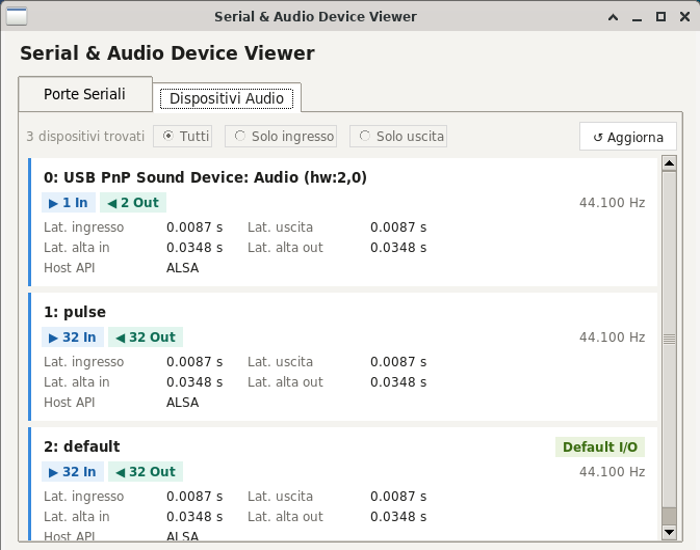
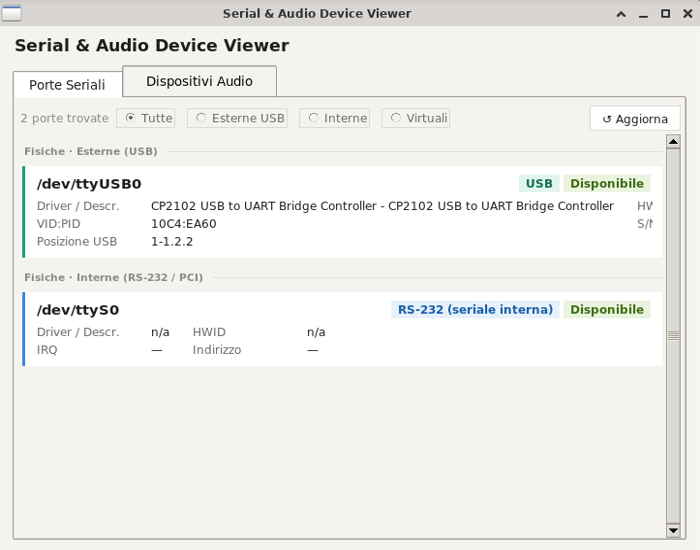
The software displays all relevant information:
For serial ports:
- Automatic classification as external physical, internal physical, or virtual
- Driver name and device description (e.g. “CP2102 USB to UART Bridge”)
- VID:PID for unique chip identification
- Serial number and USB bus location (for external ports)
- IRQ and I/O address (for internal RS-232 ports, via
setserial) - Name of the process currently using the port, with PID (via
fuser) - Status badge: Available (green) or In use (orange)
- Quick filter: All / USB external / Internal / Virtual
For audio devices:
- Number of input and output channels with visual indicators
- Default sampling rate
- Low and high latency (input and output), in seconds
- Host API (ALSA, PulseAudio, JACK…)
- Badge Default I/O, Default IN or Default OUT
- Filter: All / Input only / Output only
It can be very useful for detecting new devices: simply keep the program open while connecting the radio interface, then press Refresh immediately after plugging in the USB cable. The new port will appear with all its details.
If a device is marked as In use and no applications are running, it means another program (possibly left open by mistake) is still holding the port.
In summary
Linux is not hostile to radios: it is just transparent. Every device has a name, a driver, a story. Once you understand how /dev naming works and the difference between physical and virtual ports, configuring WSJT-X, Fldigi, or any other software becomes a matter of minutes, without endless online searching.
I wrote devenum to make this infrastructure visible and readable, not to replace understanding but to speed it up.
 Info
InfoUSB peripherals are also identified by a physical path such as
1-1.2, which is stable and identifies the exact USB port (on the computer or hub) where the device is connected. If, as is common, the radio is always plugged into the same port, it is possible to create a udev rule that generates a custom device file name, for example /dev/radio_cat.
If you want to experiment, you can create a file in /etc/udev/rules.d/99-radio.rules with a line like:
SUBSYSTEM=="tty", ATTRS{idVendor}=="10c4", ATTRS{idProduct}=="ea60", SYMLINK+="radio_cat"This instructs Linux to create a device file named /dev/radio_cat pointing to the USB device with VID 10c4 and PID ea60, regardless of where it is connected.This is useful when you have multiple similar devices – for example, a single PC managing multiple radios. In a dedicated setup with a single external serial interface, it is not necessary, since it will always be assigned to
/dev/ttyUSB0.
It is also worth noting that some USB devices have a serial number, allowing unique identification of that specific unit. For example, FTDI devices have a factory unique ID; Silicon Labs chips support it but it is not always programmed (often left at default 0001). WCH (CH340/341) and Prolific devices do not support this feature, so they cannot be uniquely distinguished. This is an important detail when choosing hardware.
InfoThe naming families
| Name | Type | Typical use case |
|---|---|---|
| /dev/ttyUSBN | External physical – USB-to-serial converter (FTDI, CP210x, Prolific) | CAT cable, TNC, Signalink interface |
| /dev/ttyACMN | External physical – CDC/ACM (native USB device) | Arduino, SDR boards with CDC firmware |
| /dev/ttySN | Internal physical – motherboard or PCI/ISA UART | Industrial PCs, old RS-232 TNCs |
| /dev/rfcommN | External physical – Bluetooth RFCOMM | Bluetooth PTT headset, wireless TNC |
| /dev/pts/N | Virtual – pseudo-terminal (PTY) | SSH sessions, screen, minicom |
Share this content:
Post Comment